
こんにちは。
「テストコード実装」「アプリ開発・ビルドの効率化」等のために「依存性注入(Dependency Injection)」や「マルチモジュール」が用いられますが、昨今では「AIによるコーディングエージェントに読んでもらいやすくなる」点も加わり、ますますその必要性が高まりました。
いざ実際に構築しようとしても、Google検索で見つかりづらかったので苦労しました。コードは書かれていても、ファイル名や全体構造が示されていなかったり、サンプルが大きすぎて構造がわかりづらかったり…
「最近のGoogleは精度が下がった」など言われていましたが、ためしに「AIモード」に聞いてみたところ、理由を踏まえて提案してもらえたので、かなり救われました。
「無料なのにここまで答えてくれるのなら、もう技術系ブログは現役から退くのでは?」と思いつつ、「書きたい人と、読みたいファンがいる限りはブログも続くのだろう」とも思います。
今回、以下の環境でシンプルに拵えたものを、設定を含めて解説しますので、ぜひ実践してみてください。
- swift-composable-architecture(以下を含む)
- The Composable Architecture(TCAの実装)
- swift-dependencies(DI) -> 依存性逆転の原則の実装
- Swift Package Manager (マルチモジュール化)
- Xcode 26.2 (Swift 6、iOS 16以上)
「依存性逆転の原則」って?

上の図のように、「ロジック層」とインフラなどの「実装層」の間にインターフェースを定義して仲介させることで、どちらも「インターフェースに従って実装する」設計です。メリットとしては
・「インターフェースは変わらないが、インフラなど下位モジュールの仕様やサービス自体を変更する場合」に、ロジック層を変更しなくて済む。(レアケースだと思いますが、無くはない)
・ロジック層と実装層の開発を別の人に分担して、並行開発がしやすくなる。
などでしょうか。
Packageによるマルチモジュール実装
Xcodeメニューの File > New > Package… を選び、Libraryとして、各レイヤー(層)のモジュールを追加します。実際のパッケージフォルダも、Appファイルがあるフォルダに追加しています。


各パッケージのPackage.swiftに、「iOS 16以上のバージョン指定」と、「依存するモジュール名とその場所」を追記していきます。
platforms: [.iOS(.v16)],dependencies: [
.package(name: "ClientModule", path: "../ClientModule"),
.package(url: "https://github.com/pointfreeco/swift-composable-architecture/", from: "1.24.1")
],
.target(
name: "FeatureModule",
dependencies: [
"ClientModule",
.product(name: "ComposableArchitecture", package: "swift-composable-architecture")
]
),// swift-tools-version: 6.2
// The swift-tools-version declares the minimum version of Swift required to build this package.
import PackageDescription
let package = Package(
name: "FeatureModule",
platforms: [.iOS(.v16)],
products: [
// Products define the executables and libraries a package produces, making them visible to other packages.
.library(name: "FeatureModule", targets: ["FeatureModule"]),
],
dependencies: [
.package(name: "ClientModule", path: "../ClientModule"),
.package(url: "https://github.com/pointfreeco/swift-composable-architecture/", from: "1.24.1")
],
targets: [
// Targets are the basic building blocks of a package, defining a module or a test suite.
// Targets can depend on other targets in this package and products from dependencies.
.target(
name: "FeatureModule",
dependencies: [
"ClientModule",
.product(name: "ComposableArchitecture", package: "swift-composable-architecture")
]
),
.testTarget(
name: "FeatureModuleTests",
dependencies: ["FeatureModule"]
),
]
)最初の図の通り、FeatureModuleからは、ClientModuleに依存していることを明記します。
// swift-tools-version: 6.2
// The swift-tools-version declares the minimum version of Swift required to build this package.
import PackageDescription

let package = Package(
    name: "ClientModule",
    platforms: [.iOS(.v16)],
    products: [
        // Products define the executables and libraries a package produces, making them visible to other packages.
        .library(name: "ClientModule", targets: ["ClientModule"]),
    ],
    dependencies: [
        .package(name: "InterfaceModule", path: "../InterfaceModule"),
        .package(url: "https://github.com/pointfreeco/swift-composable-architecture/", from: "1.24.1")
    ],
    targets: [
        // Targets are the basic building blocks of a package, defining a module or a test suite.
        // Targets can depend on other targets in this package and products from dependencies.
        .target(
            name: "ClientModule",
            dependencies: [
                "InterfaceModule",
                .product(name: "ComposableArchitecture", package: "swift-composable-architecture")
            ]
        ),
        .testTarget(
            name: "ClientModuleTests",
            dependencies: ["ClientModule"]
        ),
    ]
)
ClientModuleには、インフラなどの実装層ではなく、InterfaceModuleに依存します。
依存される側「FeatureModule」は参照しません。
// swift-tools-version: 6.2
// The swift-tools-version declares the minimum version of Swift required to build this package.
import PackageDescription

let package = Package(
    name: "InterfaceModule",
    platforms: [.iOS(.v16)],
    products: [
        // Products define the executables and libraries a package produces, making them visible to other packages.
        .library(name: "InterfaceModule", targets: ["InterfaceModule"]),
    ],
    dependencies: [
        .package(url: "https://github.com/pointfreeco/swift-composable-architecture/", from: "1.24.1")
    ],
    targets: [
        // Targets are the basic building blocks of a package, defining a module or a test suite.
        // Targets can depend on other targets in this package and products from dependencies.
        .target(
            name: "InterfaceModule",
            dependencies: [
                .product(name: "ComposableArchitecture", package: "swift-composable-architecture")
            ]
        ),
        .testTarget(
            name: "InterfaceModuleTests",
            dependencies: ["InterfaceModule"]
        ),
    ]
)InterfaceModuleは、ClientModuleと、ImplementationModuleに「依存されます」。こちらからの他モジュールの依存(dependencies)はありません。
// swift-tools-version: 6.2
// The swift-tools-version declares the minimum version of Swift required to build this package.
import PackageDescription

let package = Package(
    name: "ImplementationModule",
    platforms: [.iOS(.v16)],
    products: [
        // Products define the executables and libraries a package produces, making them visible to other packages.
        .library(name: "ImplementationModule", targets: ["ImplementationModule"]),
    ],
    dependencies: [
        .package(name: "InterfaceModule", path: "../InterfaceModule"),
    ],
    targets: [
        // Targets are the basic building blocks of a package, defining a module or a test suite.
        // Targets can depend on other targets in this package and products from dependencies.
        .target(
            name: "ImplementationModule",
            dependencies: [
                "InterfaceModule",
            ]
        ),
        .testTarget(
            name: "ImplementationModuleTests",
            dependencies: ["ImplementationModule"]
        ),
    ]
)
実装層 ImplementationModuleも、インターフェース層 InterfaceModuleに依存します。
各モジュールへDI(依存性注入)
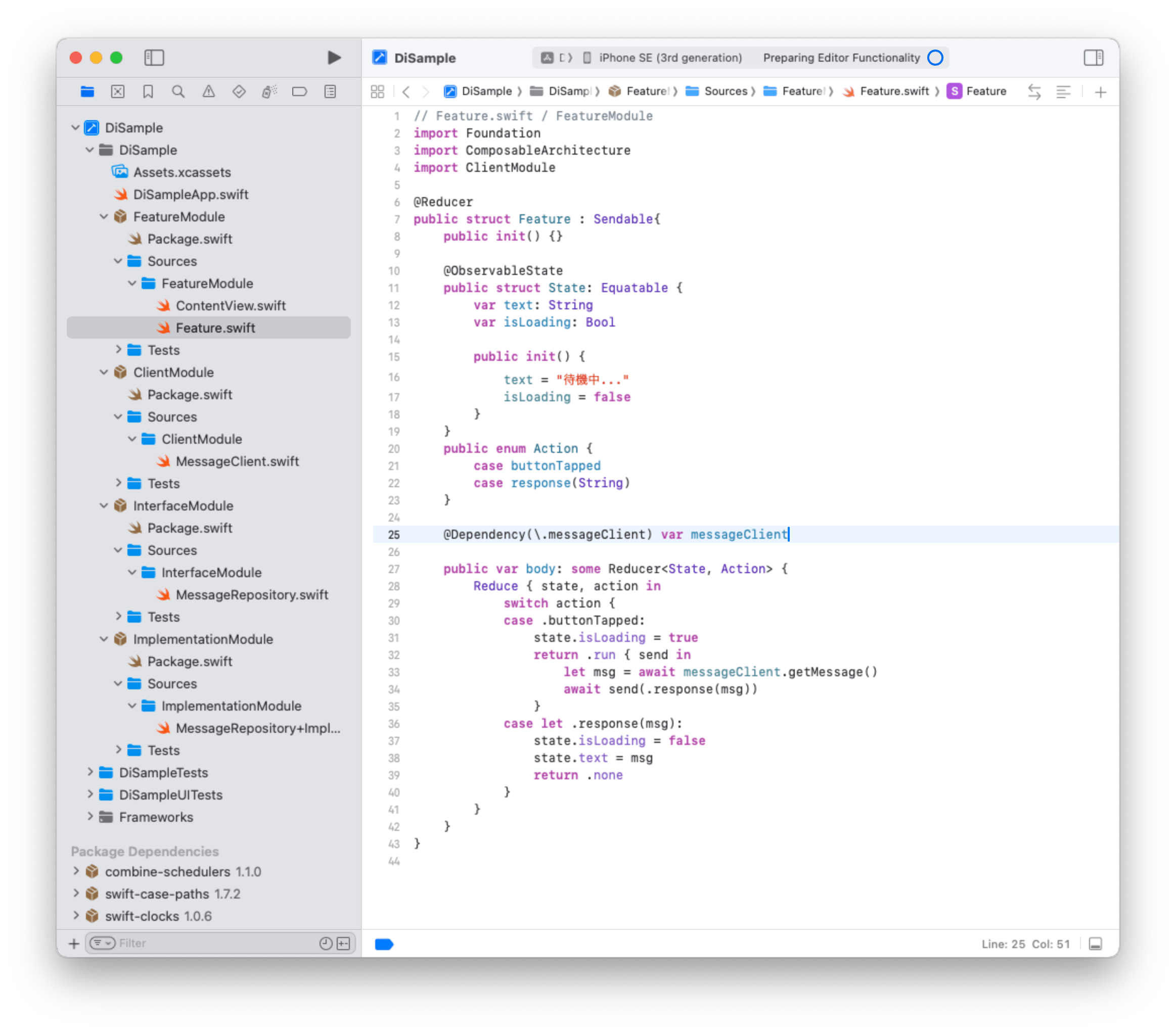
以下のプロジェクトナビゲーターの一覧の通り、シンプルに各モジュール1,2個のファイルを追加しました。
それぞれどのようにDIするかを挙げていきます。
FeatureModule

ClientModule
// MessageClient.swift / ClientModule
import ComposableArchitecture
import InterfaceModule

// メソッドのインターフェース定義
public struct MessageClient: Sendable {
    public var getMessage: @Sendable () async -> String
    public init(getMessage: @escaping @Sendable () async -> String) {
        self.getMessage = getMessage
    }
}

// キーの登録 Clientの実体をここに書く
extension MessageClient: DependencyKey {
    public static var liveValue: Self {
        @Dependency(\.messageRepository) var repository // リポジトリの実体を注入
        return Self(getMessage: {
            await repository.fetch()
        })
    }
}
// 注入元の登録(Providerとかコンテナとか)
extension DependencyValues {
    public var messageClient: MessageClient {
        get { self[MessageClient.self] }
        set { self[MessageClient.self] = newValue }
    }
}
ClientModuleではliveValueにロジック層の実体を書いています。この中で Interfaceの型で実装層の処理を注入します。
InterfaceModule
// MessageRepository.swift / InterfaceModule
// Interfaceとして、ClientとImplementation両方に「依存される」(依存性逆転の原則)
import Dependencies

public struct MessageRepository: Sendable {
    public var fetch: @Sendable () async -> String
    // 外部からインスタンスを作れるようにpublic initが必要
    public init(fetch: @escaping @Sendable () async -> String) {
        self.fetch = fetch
    }
}

// キーの登録(ここでは実装を書かない)
extension MessageRepository: DependencyKey {
    // デフォルト
    public static let liveValue = Self(
        fetch: {
            fatalError("MessageRepository の実体(liveValue)が登録されていません。")
        }
    )

    // プレビュー実行時に自動で呼ばれる (ContentViewプレビューでwithDependenciesを定義しない場合)
    public static let previewValue = Self(
        fetch: { "プレビュー用のダミーデータ" }
    )
}

extension DependencyValues {
    public var messageRepository: MessageRepository {
        get { self[MessageRepository.self] }
        set { self[MessageRepository.self] = newValue }
    }
}
Interface層では実体は書きませんが、
実装しなかった場合のデフォルト値(liveValue)や、Xcodeのプレビュー時の実装(previewValue)を用意できます。
ImplementationModule
// MessageRepository+Impl.swift / ImplementationModule
import Dependencies
import InterfaceModule

extension MessageRepository {
    // ここにRepository層に注入する、インフラ実装などを書く
    public static let impl = Self(
        fetch: {
            try? await Task.sleep(for: .seconds(1)) // 通信擬似待ち
            return "Repositoryから届いたデータです"
        }
    )
}
実装層で、インフラなどの下位モジュールの実体を書きます。
起動時のApp構造体init()で、この実体を注入しています。
Modelはどうする?
このプロジェクトではシンプルすぎて、Model(データ型)を用意しませんでしたが、以下のどちらかの手段になるでしょうか。
・インターフェース層に型定義を置いて、ロジック層と実装層に届ける&ロジック層からUI層向けデータに変換(これをメインスレッドでリソースアクセスする)
・小さいプロジェクトなので、上記をすべてModel層に置き、それぞれの層から依存する
Swift 6は排他制御やメインスレッド管理について、コンパイラからエラーを出すようになるので、UI向けとそうでないもので、分けることになると思います。
